
The GTM Engineering Playbook: 11 Plays Working Right Now
The GTM RevOps stack we use to turn signal into pipeline. 11 plays, the exact tools, and the workflow behind each one. Trade-show intelligence, signal-based outbound, CEO DMs in 90 seconds, and more.
Fractional Demand Team
Everyone says “GTM engineering.” Almost nobody shows you the plays.
We get asked what GTM engineering actually means often enough that we wrote it down. Not the theory. The exact plays we run for ourselves and our clients, the tools behind each one, and the workflow that turns a buying signal into pipeline.
Eleven of them. All working right now. Steal whichever ones fit your stack.
How we think about GTM RevOps.
Less about clicking buttons inside a CRM. More about orchestrating a stack that fits your business.
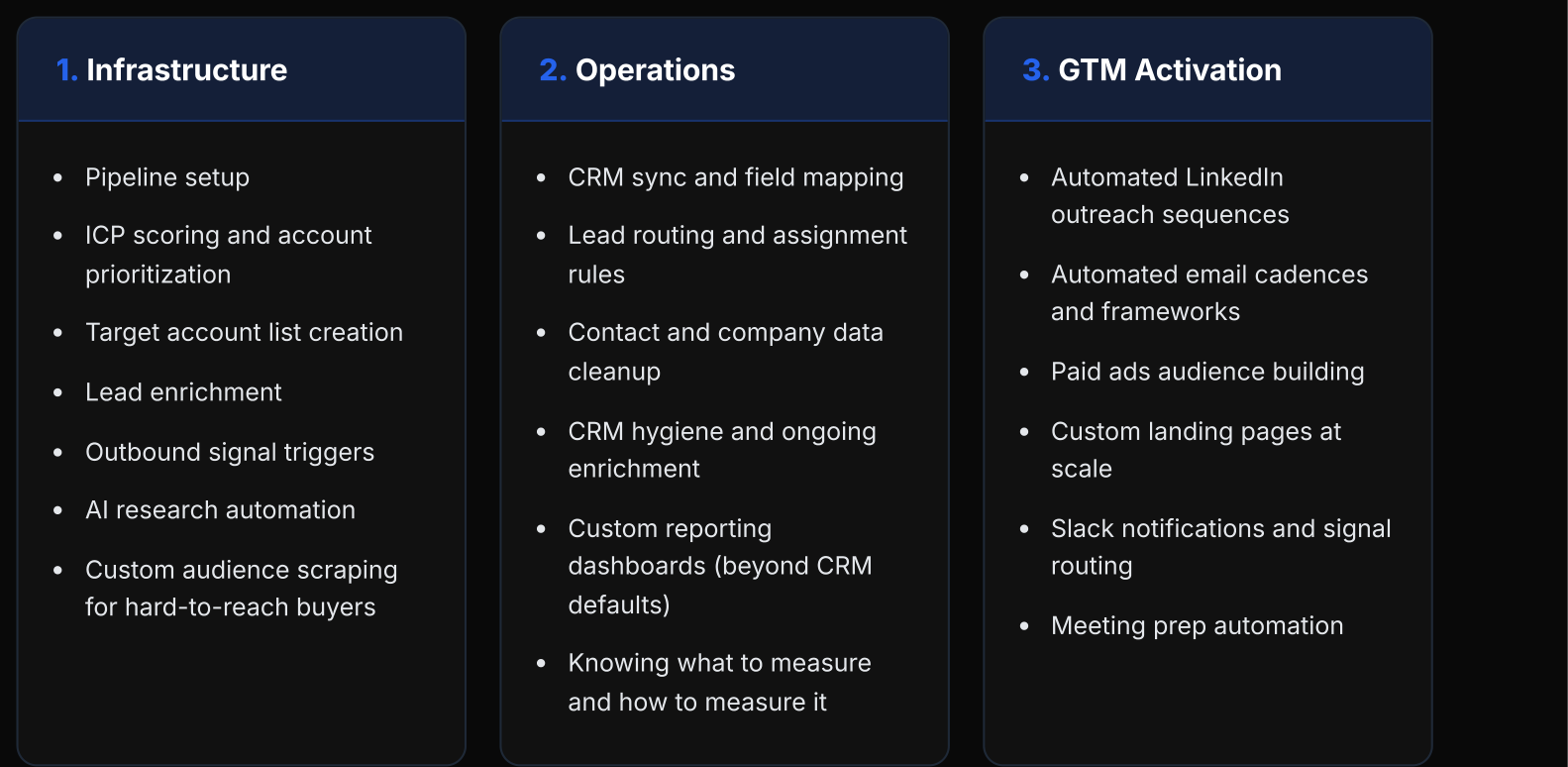
RevOps used to be about knowing where every button lived inside HubSpot. That still matters. But the bar moved. With AI, the value isn't navigating someone else's platform anymore. It's building custom dashboards that don't depend on what the CRM lets you build, consolidating disparate signals into something a rep can actually act on, and knowing when to buy a tool versus when to build one.
Trade Show Intelligence Dashboard
Walk into a conference with every A-tier account pre-scored before the doors open.
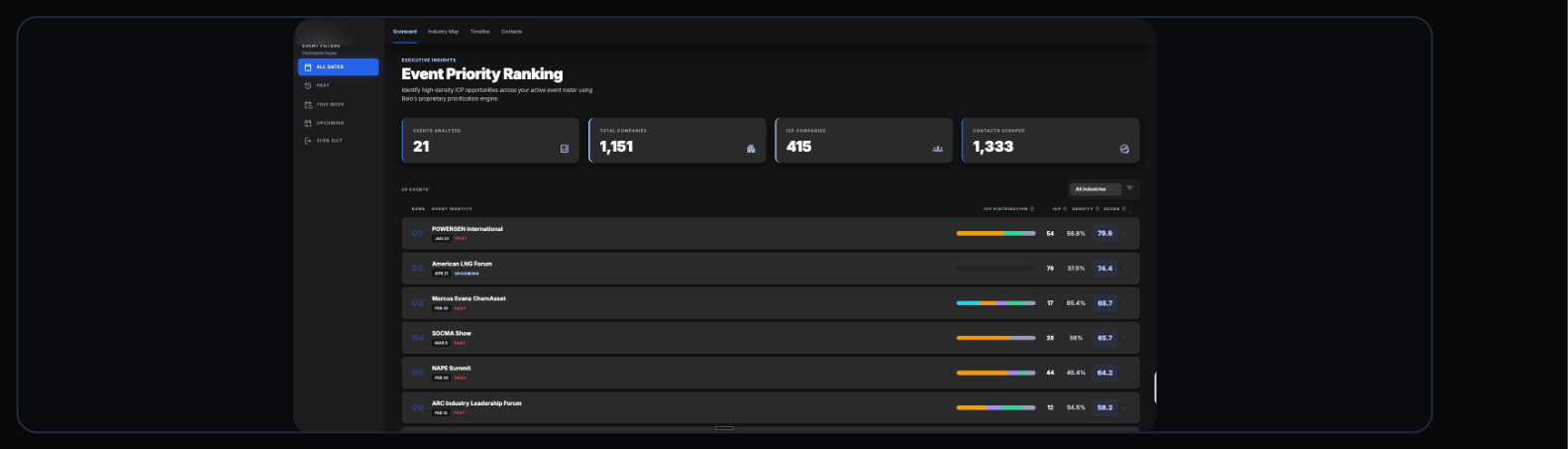
Trade shows are the densest ICP moment in the B2B calendar. Three thousand of your exact buyers in one building for three days. Most teams walk in with a printed exhibitor list, a sales deck, and the hope of bumping into the right person between sessions or at their booth.
You get a prospectus from the show, which helps, but it doesn't tell you who's actually going to be there. The prep every team knows they should do rarely happens, because it's manual, the list changes until the show opens, and nobody has hours to pull it all together.
Your AEs walk the floor with a purpose-built plan, not a lanyard and a prayer. The booth still matters. The prep is what decides whether the booth converts.
Dynamic Add-On Engine to Expansion Email
Turn your add-on catalog and account usage into personalized expansion revenue.
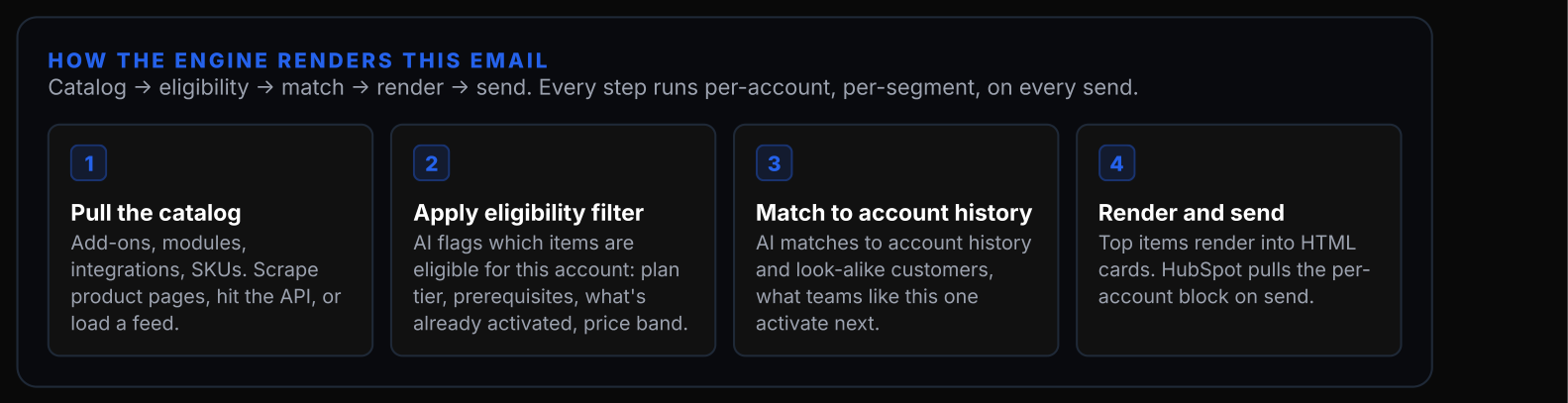
Most expansion emails are generic because the data required to personalize them lives in five different places and nobody has wired it together. A SaaS customer is on a $4K-per-month plan with four of your twelve add-ons activated. The "consider upgrading" email goes to every account in that plan tier with the same copy.
It drives almost nothing, because it asks the customer to do all the work of figuring out which add-ons are relevant. The ones they would actually activate are sitting in your product catalog and their usage data.
The generic email was a nothing-burger. The dynamic version turns your add-on catalog into a merchandised, personalized expansion offer per account. Built once, runs forever, re-renders per customer on every send.
Inbound Form to CEO LinkedIn DM + Auto Competitor Intel
The 90-second response that makes every other follow-up look asleep.
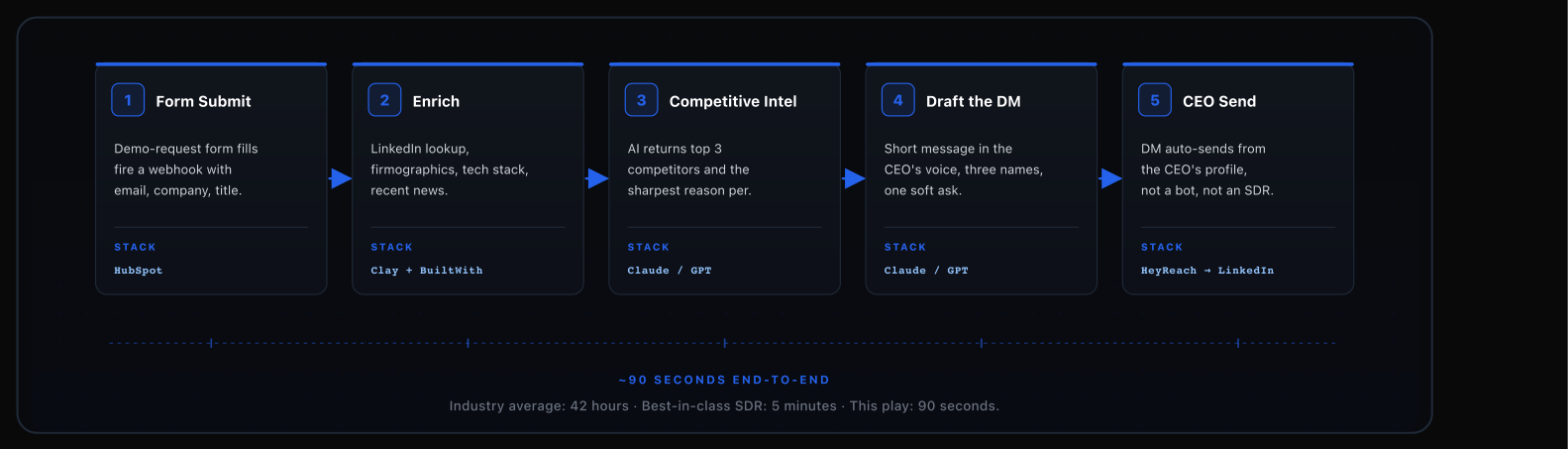
Demo-request forms are the warmest moment in your funnel. The average B2B company takes 42 hours to respond to one. Best-in-class teams hit 5 minutes. By 42 hours, your prospect has already booked three other calls.
The fix isn't picking a faster follow-up. It's running more than one at the same time: a real email and an automated LinkedIn DM that goes out within 90 seconds. The kicker: the DM lands from the CEO's profile, not a shared inbox or an SDR.
The CEO looks personally attentive without actually being personally attentive. Response time collapses from hours to seconds. The message opens a real conversation, not a demo calendar link, on a channel the prospect actually checks.
LinkedIn Ad Engagement to Clay to Outbound
The ad does the warming. The signal fires. The BDR calls. That is the whole play.
LinkedIn ads generate impressions, clicks, comments, reactions. LinkedIn gives you none of it at a person level. Your CEO's thought leader ad might reach the exact 400 VPs of Legal Ops you're targeting and all you'll see in Campaign Manager are engagement metrics.
The signal is there. The tool layer that captures it and routes it to a human is what's missing.
Ad spend finally connects to results. Every dollar you drive into engagement now produces a routed, scored signal to a human who can act, and pipeline you can attribute back to the campaign that sourced it.
Signal-Based Outbound
Listen to what your target accounts are talking about on LinkedIn. Score it. Reach out when it matters.
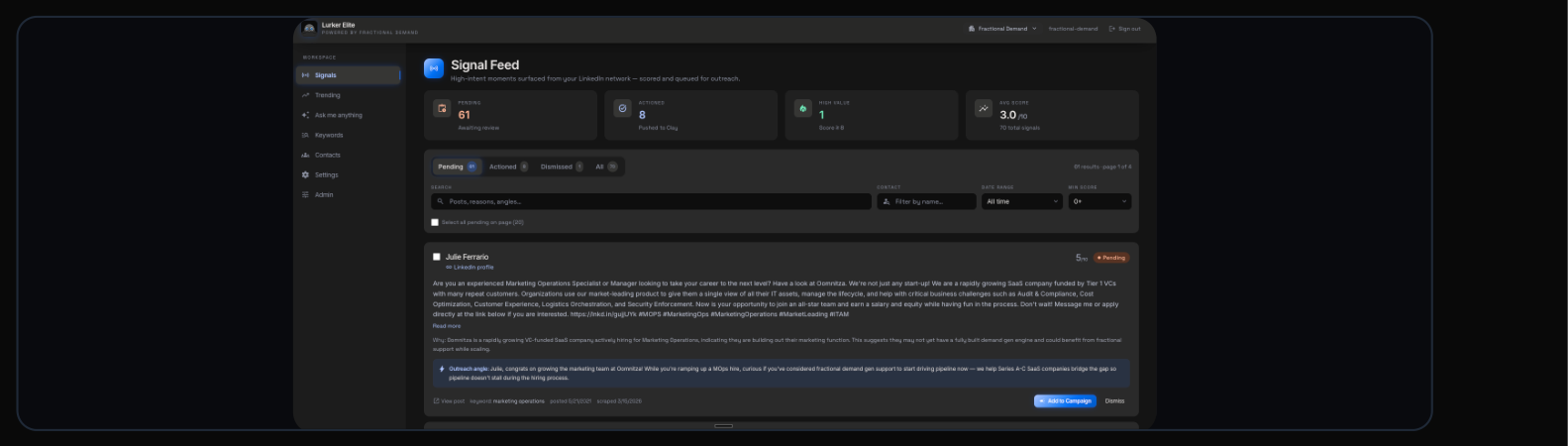
LinkedIn is loud. Your buyers are posting, commenting, sharing, and reacting all day. Some of it is about your category. Most of it isn't. Buried in that noise are the conversations that actually matter: a target account talking about a problem you solve, a competitor they're frustrated with, a project they just kicked off.
Almost nobody surfaces those signals, sorts them, and does anything with the list. The signal is sitting in plain sight.
Your AEs and SDRs know what their target accounts are talking about on LinkedIn before they pick up the phone. Instead of cold outreach with a generic value prop, you reach out with context, referencing the exact post or topic the prospect surfaced last week. The first line of the email is the prospect's own words.
Anonymous Visitor to Account Alerting
Someone at an ICP account just hit your pricing page. Your team should know within 30 seconds.
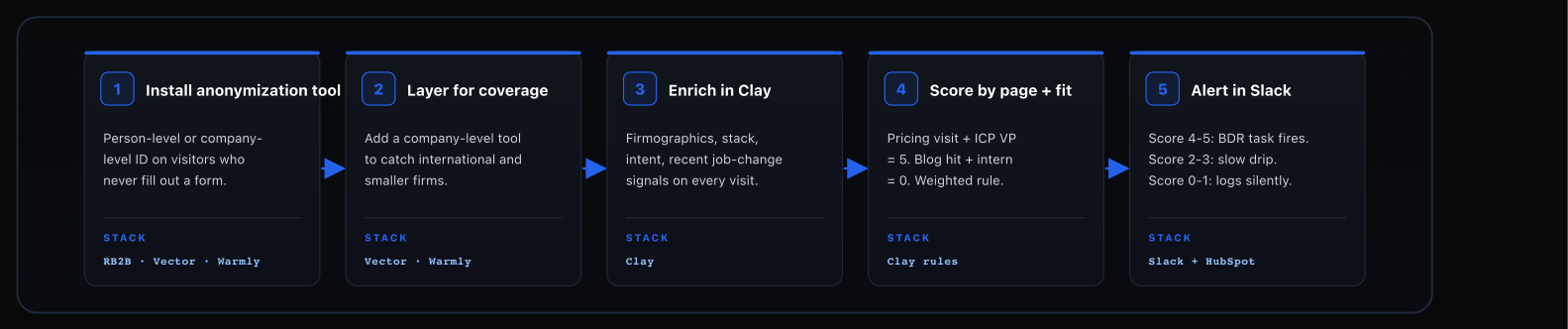
A huge chunk of your website traffic is your ICP. They visit pricing, they compare integrations, they download a case study, they leave. No form fill, no chat, nothing. Your sales team has no idea they were ever there.
You're buying traffic, converting a fraction of it on forms, and letting the rest evaporate anonymously.
Your site stops being a black box. Every anonymous ICP visit turns into a routed, scored, context-rich task on a real human's desk.
Job-Change + Funding Signals to Warm Outreach
Your best champion just took a senior role at a new company. Reach out before they pick the next vendor.
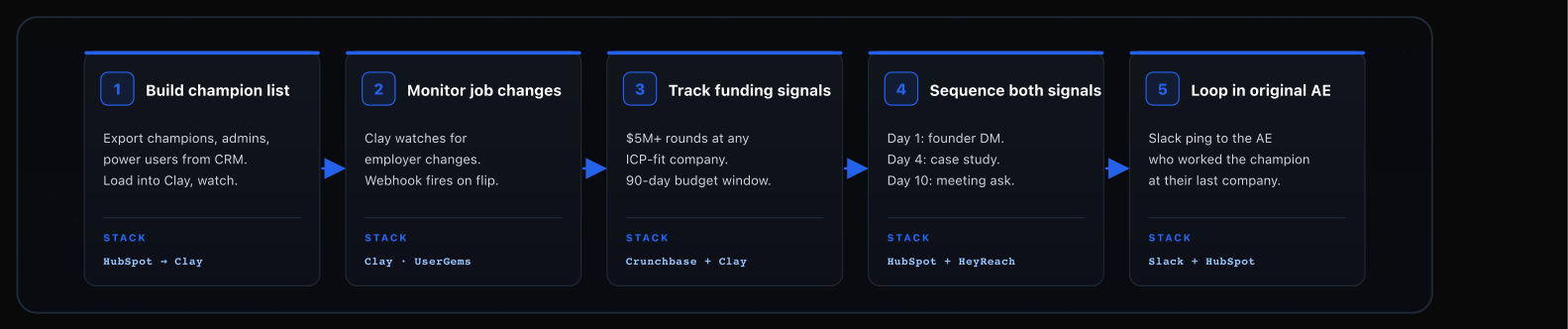
Your customer list is the warmest network you have. When a champion leaves Company A and takes a senior role at Company B, there's a tight window where they're picking vendors and rebuilding their stack. Newly hired execs spend most of their budget in the first 100 days. Champions who already used your product are 3 to 5x more likely to convert versus cold outreach.
Most teams find out six months later when the new person books a demo. By then they've signed with someone else. The trigger is public. The outreach just has to fire automatically.
Your pipeline fills itself from the customer base you already built. Net-new logo acquisition starts with a familiar name in the inbox.
Competitor Displacement via Tech Stack Data
Find every company running your competitor. Rank them. Displace them systematically.
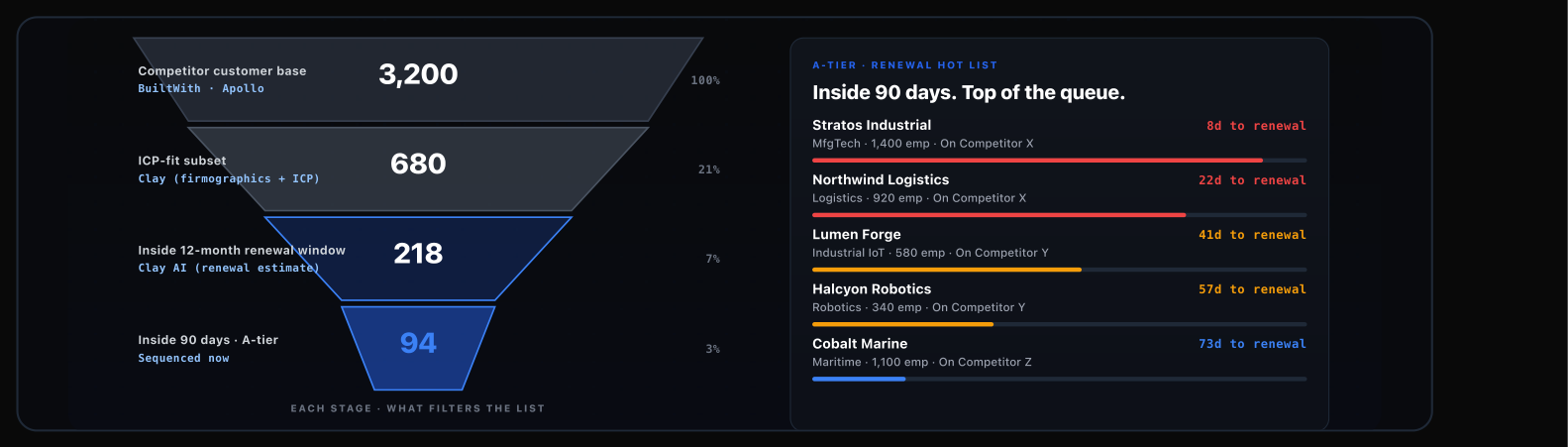
Your biggest competitors already did the expensive part. They sold your buyer on the category. Those accounts know the problem, know the tool exists, know how to use it. They picked the wrong product, or the right product at the wrong price.
Your displacement list is sitting in a data source you can query this week.
Competitor displacement stops being a one-off side project and becomes a systematic program with a renewal-aware timeline.
Automated Pre-Meeting Research Briefs
Every AE walks into every call with a 90-second brief that used to take an hour to write.
AEs are supposed to show up prepared. Most don't, because the research is manual and their calendars are full. The best AEs spend 20 to 40 minutes prepping for every first meeting. The worst spend zero.
The delta shows up in every call: which competitors got mentioned, which pain points got surfaced, which follow-ups actually landed. Prep quality is the hidden variable most teams never measure.
Every first call starts with the AE knowing what the prospect cares about, what's on their stack, and which questions open real conversation. The floor rises for the whole team, not just your best reps.
Always-On Email Engine
Built once. Always generating revenue.
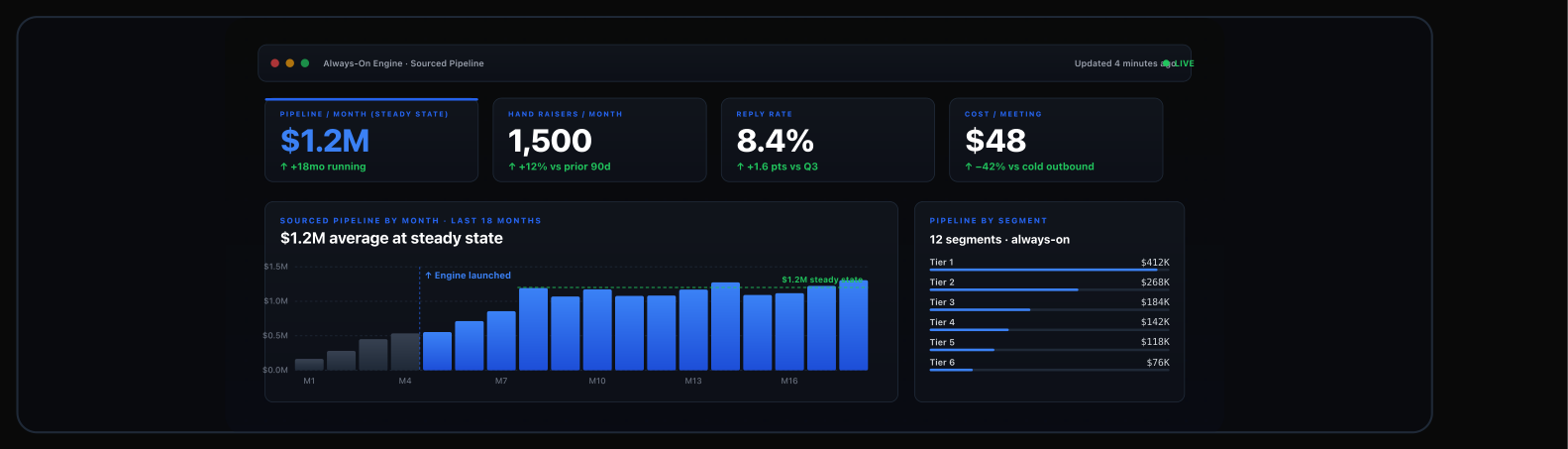
Most lifecycle and nurture programs are set-and-forget. Every customer in a tier gets the same generic email. Every new signup drops into the same onboarding sequence. The work of figuring out which customer types you actually have and what each one needs to hear right now never happens, so the automation runs but nothing resonates.
The engineered version segments the audience, maps the message, and lets it run.
For one fintech client, the engine is generating $1.2M per month in originations. Marketing automation done well. Customers are segmented by type, messaging is mapped to where they are in the lifecycle, and new customers get the right message at the right time.
CRM Data Hygiene + Custom-Event Signal Scoring
The play that decides whether the other ten actually work.
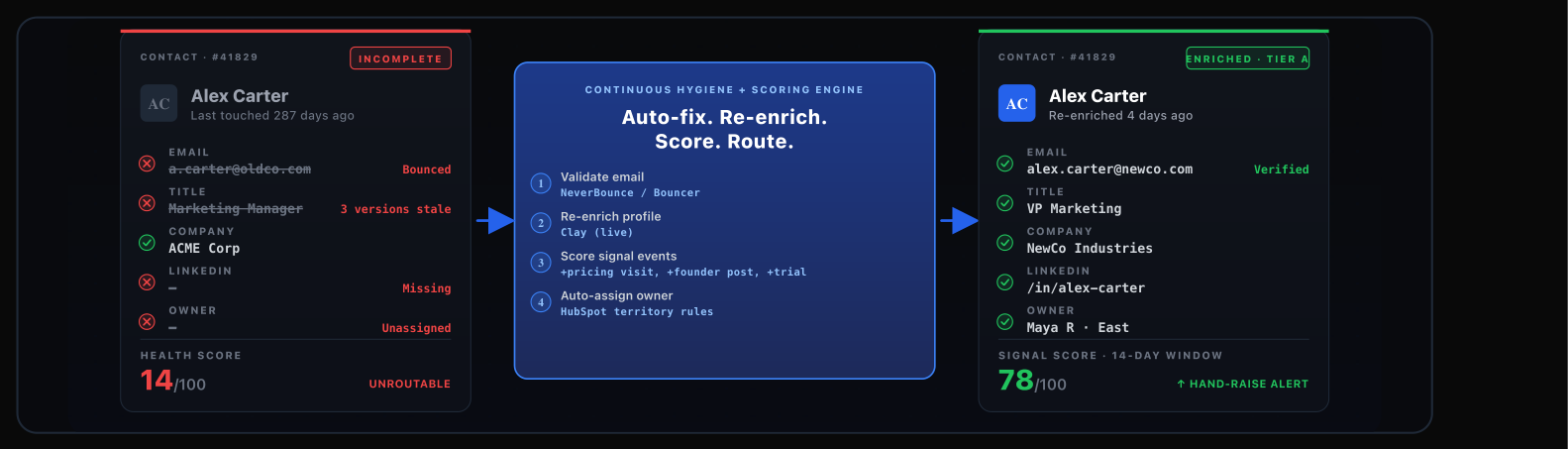
Every play in this book falls apart on dirty data. Signal-based outbound fires on bad contacts. Dynamic emails render against junk. Pre-meeting briefs surface the wrong attendee's LinkedIn. Most teams know this and still treat hygiene as a once-a-year cleanup project.
The math doesn't math. Hygiene has to run daily or the whole engine degrades.
The other 10 plays fire on clean data. Signal scoring becomes trustworthy instead of noisy. Routing moves from "title matches ICP" to "behavior plus fit match ICP."
- 1.The signal is almost always already there. The work is capturing it, scoring it, and routing it to a human before the window closes.
- 2.Clean data is the whole game. Build Play 11 first. Every flashy play above it degrades the moment your CRM goes stale.
- 3.The tools are interchangeable. The sequence is the play. Start with whatever your stack already pays for and layer in from there.
Want the playbook PDF? Or want us to run these with you?
The full playbook PDF has all 11 plays, diagrams, and stacks in one place. Or book a call and we'll map which plays would move the needle against your current GTM setup.